
OIDC Reference
Complete reference for BlokSec’s OpenID Connect implementation. For a step-by-step integration guide, see the OIDC Quickstart.
BlokSec’s provider is built on node-oidc-provider and implements the standard OpenID Connect and OAuth 2.0 endpoints. The fastest way to integrate is to point a standard OIDC client library at the discovery document and let it configure itself.
Base URLs
Section titled “Base URLs”Each environment is a separate issuer. Use the base URL that matches the environment your application targets.
| Environment | Base URL | Issuer (iss) |
|---|---|---|
| Production | https://api.bloksec.io |
https://api.bloksec.io/oidc |
| Sandbox / development | https://api.bloksec.dev |
https://api.bloksec.dev/oidc |
All OIDC endpoints live under the /oidc path. The rest of this page uses the production base URL; substitute the sandbox URL for testing.
Discovery
Section titled “Discovery”GET /oidc/.well-known/openid-configurationReturns the full OIDC discovery document with all endpoint URLs, supported scopes, grant types, claims, and signing algorithms. Most OIDC client libraries use this endpoint for automatic configuration — you give them the issuer URL and they fetch everything else.
Application types
Section titled “Application types”When you create an application in the BlokSec admin console, you choose a type: Web application, Single-Page App (SPA), or Native app. The type determines whether BlokSec treats your client as confidential or public, what credentials it issues, and which token endpoint authentication methods are available.
Web application
Section titled “Web application”A server-side app running in a trusted environment (Node.js, .NET, Python, etc.) where the client secret never leaves the server. BlokSec issues a client secret and treats it as a confidential client.
Use this type when:
- Your callback handler runs on a server you control
- You need refresh tokens for long-lived sessions
- You want the strongest token endpoint authentication options (JWT assertions, mTLS)
Single-Page App (SPA)
Section titled “Single-Page App (SPA)”A browser-only JavaScript app where no server-side component can hold a secret. BlokSec creates a public client — no client secret is issued. PKCE (S256) is required in place of client authentication.
Use this type when:
- Your callback runs entirely in the browser (React, Vue, Angular, etc.)
- You cannot keep a secret out of the browser bundle or DevTools
- Redirect URIs use
https
Native app
Section titled “Native app”A mobile or desktop application. Like a SPA, it is a public client — no secret is issued and PKCE is required. Redirect URIs can be custom URI scheme (e.g. com.example.app://callback) or loopback (http://127.0.0.1).
Use this type when:
- Your app runs on iOS, Android, macOS, Windows, or Linux
- You need to use a custom scheme or loopback redirect URI
Comparison
Section titled “Comparison”| Web application | SPA | Native app | |
|---|---|---|---|
| Client type | Confidential | Public | Public |
| Client secret | Yes | No | No |
| PKCE required | No (recommended) | Yes (S256) | Yes (S256) |
| Refresh tokens | Yes (offline_access + prompt=consent) |
Yes (offline_access + prompt=consent) |
Yes (offline_access + prompt=consent) |
| Typical redirect URI | https://yourapp.com/callback |
https://yourapp.com/callback |
Custom scheme or loopback |
token_endpoint_auth_method |
client_secret_basic (default), client_secret_post, client_secret_jwt, private_key_jwt, tls_client_certificate |
none |
none |
Authorization endpoint
Section titled “Authorization endpoint”GET /oidc/authStarts the authentication flow. Redirect the user’s browser to this endpoint.
Parameters
Section titled “Parameters”| Parameter | Required | Description |
|---|---|---|
client_id |
Yes | Application’s Client ID (a DID, assigned when you create the application) |
redirect_uri |
Yes | Must exactly match a redirect URI registered on the application |
response_type |
Yes | code for the authorization code flow |
scope |
Yes | Space-separated scopes (must include openid) |
state |
Recommended | Opaque value echoed back to your callback for CSRF protection |
nonce |
Recommended | Random value bound into the ID token; verify it after token exchange |
prompt |
Conditional | login forces re-authentication; consent forces the consent screen. Required to obtain a refresh token — see Refresh tokens |
code_challenge |
Public clients | S256 PKCE challenge (required when token_endpoint_auth_method is none) |
code_challenge_method |
Public clients | Must be S256 |
Response
Section titled “Response”On success, redirects to redirect_uri with:
code— authorization code, valid for 10 minutes and usable oncestate— echo of yourstateparameter
On failure, redirects with error and error_description query parameters.
Token endpoint
Section titled “Token endpoint”POST /oidc/tokenContent-Type: application/x-www-form-urlencodedExchanges an authorization code, refresh token, or client credentials for tokens. Confidential clients authenticate here; the default method is client_secret_basic (HTTP Basic auth with the Client ID and secret), and client_secret_post is also accepted.
Authorization code exchange
Section titled “Authorization code exchange”| Parameter | Required | Description |
|---|---|---|
grant_type |
Yes | authorization_code |
code |
Yes | The authorization code from the callback |
redirect_uri |
Yes | Must match the redirect_uri from the authorization request |
client_id |
Yes | Application’s Client ID |
client_secret |
Confidential clients | Application’s client secret |
code_verifier |
Public clients | The PKCE verifier whose challenge was sent to the authorization endpoint |
Refresh token exchange
Section titled “Refresh token exchange”| Parameter | Required | Description |
|---|---|---|
grant_type |
Yes | refresh_token |
refresh_token |
Yes | A previously issued refresh token |
client_id |
Yes | Application’s Client ID |
client_secret |
Confidential clients | Application’s client secret |
scope |
No | A subset of the originally granted scopes |
Client credentials
Section titled “Client credentials”For machine-to-machine authentication where the application acts as itself, with no user involved.
| Parameter | Required | Description |
|---|---|---|
grant_type |
Yes | client_credentials |
client_id |
Yes | Application’s Client ID |
client_secret |
Yes | Application’s client secret |
scope |
No | Requested scopes |
Response
Section titled “Response”{ "access_token": "0pHqW8c5Rf...opaque", "id_token": "eyJhbGci...", "token_type": "Bearer", "expires_in": 3600, "refresh_token": "8xY...", "scope": "openid email profile offline_access"}access_token— an opaque token (see Token formats). Present it as a Bearer token to BlokSec endpoints; do not attempt to decode it.id_token— a signed JWT containing the user’s identity claims.expires_in— always present, so client libraries can schedule renewal.client_credentialsresponses do not includeid_tokenorrefresh_token.
UserInfo endpoint
Section titled “UserInfo endpoint”GET /oidc/meAuthorization: Bearer {access_token}Returns claims about the authenticated user, filtered by the scopes the access token was granted. This is the standard way for a client to fetch the user’s profile after login.
Response
Section titled “Response”{ "sub": "did:bloksec:abc123", "email": "user@example.com", "email_verified": true, "given_name": "Jane", "family_name": "Smith", "name": "Jane Smith", "preferred_username": "jane", "upn": "jane", "user_did": "did:bloksec:abc123"}JWKS endpoint
Section titled “JWKS endpoint”GET /oidc/jwksReturns the JSON Web Key Set used to sign ID tokens. Use these keys to verify ID token signatures. Access tokens are opaque and have no signature to verify — validate them with introspection or UserInfo instead.
End session endpoint
Section titled “End session endpoint”GET /oidc/session/endRP-initiated logout. Redirect the user’s browser here to end their BlokSec session. After logout, BlokSec redirects back to post_logout_redirect_uri if one is supplied and registered.
| Parameter | Required | Description |
|---|---|---|
id_token_hint |
Recommended | The ID token issued to the client, identifying the session to end |
client_id |
Recommended | Application’s Client ID |
post_logout_redirect_uri |
No | Must match a registered post-logout redirect URI |
state |
No | Echoed back on the redirect |
Introspection and revocation
Section titled “Introspection and revocation”| Endpoint | Method | Description |
|---|---|---|
/oidc/token/introspection |
POST | Token introspection (RFC 7662) — returns token metadata and an active flag |
/oidc/token/revocation |
POST | Token revocation (RFC 7009) |
Introspection
Section titled “Introspection”Because access tokens are opaque, a resource server validates them by calling the introspection endpoint:
POST /oidc/token/introspectionContent-Type: application/x-www-form-urlencoded
token={access_token}
A confidential client authenticates with HTTP Basic auth. A public client may introspect only tokens that were issued to itself. The response includes:
{ "active": true, "client_id": "did:bloksec:abc123", "sub": "did:bloksec:user456", "scope": "openid email profile", "exp": 1619704640, "iat": 1619701040}If the token is invalid, expired, or revoked, active is false and no other fields are returned.
Scopes and claims
Section titled “Scopes and claims”Available scopes
Section titled “Available scopes”| Scope | Claims included |
|---|---|
openid |
sub, aud, amr (required for every request) |
email |
email, email_verified |
profile |
name, given_name, family_name, middle_name, nickname, preferred_username, picture, profile, website, gender, birthdate, zoneinfo, locale, updated_at, upn, user_did, user_short_code, account |
phone |
phone_number, phone_number_verified |
offline_access |
No claims — grants a refresh token (see below) |
Standard JWT claims (iss, aud, exp, iat, auth_time, sid, nonce, amr) appear in the ID token regardless of scope.
In the admin console, the application’s Scopes setting (on the application form) controls which of these scopes the app is permitted to request. A request for a scope the application isn’t allowed to use is ignored.
BlokSec-specific claims
Section titled “BlokSec-specific claims”| Claim | Description |
|---|---|
account |
JSON-encoded object with account-specific data, including the user’s roles for this application |
upn |
User Principal Name (typically the account name) |
user_did |
The user’s Decentralized Identifier |
user_short_code |
Short code identifying the user-client relationship |
Preview ID token
Section titled “Preview ID token”The admin console can show you the exact claims your application will receive for a real account — without running a full login flow. This is the fastest way to confirm your scope configuration produces the claims your app expects.
On the application’s detail page (available once the app has been created), click Preview ID Token, then select an account. BlokSec renders the ID token claims that account would receive given the application’s configured scopes, and lists the active scopes used. A Copy button copies the JSON.
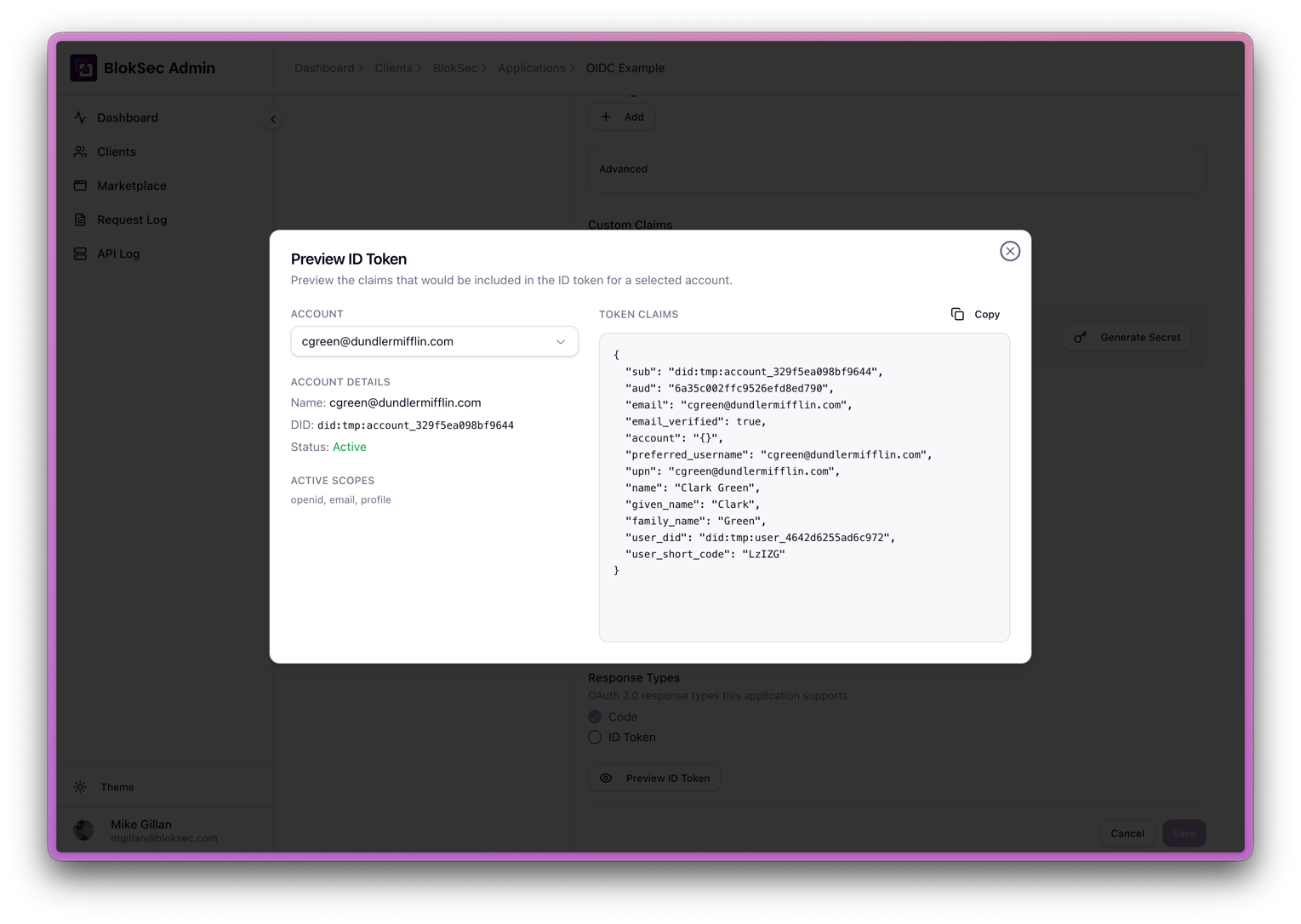
Example claims for an app with the openid email profile scopes granted:
{ "sub": "did:bloksec:account_abc123", "aud": "your-client-id", "email": "jane@example.com", "email_verified": true, "account": "{}", "preferred_username": "jane@example.com", "upn": "jane@example.com", "name": "Jane Smith", "given_name": "Jane", "family_name": "Smith", "user_did": "did:bloksec:user_def456", "user_short_code": "Lz1ZG"}Token formats
Section titled “Token formats”| Token | Format | How to validate |
|---|---|---|
| ID token | Signed JWT (PS256 or RS256) | Verify the signature against the JWKS endpoint, then check iss, aud, exp, and nonce |
| Access token | Opaque string | Call introspection or UserInfo; do not decode |
| Refresh token | Opaque string | Exchange at the token endpoint |
Token lifetimes
Section titled “Token lifetimes”| Token | Lifetime |
|---|---|
| Access token | 1 hour |
| ID token | 1 hour |
| Authorization code | 10 minutes |
| Client credentials token | 10 minutes |
| Refresh token | 7 days |
| Session | 1 hour |
| Grant (consent) | 14 days |
Supported grant types
Section titled “Supported grant types”| Grant type | Description |
|---|---|
authorization_code |
Standard browser-based login (default) |
refresh_token |
Exchange a refresh token for a new access token |
client_credentials |
Server-to-server authentication, no user |
An application must have a grant type enabled on its configuration to use it. By default, applications are created with authorization_code, refresh_token, and client_credentials.
Refresh tokens and offline_access
Section titled “Refresh tokens and offline_access”To receive a refresh token, two conditions must hold:
- The application has the
refresh_tokengrant type enabled (the default). - The authorization request includes
scope=...offline_accessandprompt=consent.
The prompt=consent parameter is the most commonly missed setting. The OpenID Connect spec requires it when requesting offline_access, and without it the provider drops offline_access from the request and returns no refresh token.
Token endpoint authentication methods
Section titled “Token endpoint authentication methods”| Method | Used by |
|---|---|
client_secret_basic |
Confidential clients (default) — Client ID and secret via HTTP Basic auth |
client_secret_post |
Confidential clients — credentials in the form body |
client_secret_jwt, private_key_jwt |
Confidential clients using signed JWT client assertions |
none |
Public clients (SPAs, native apps) — PKCE is required instead |
Advanced: token endpoint authentication methods
Section titled “Advanced: token endpoint authentication methods”These methods apply to Web application (confidential) clients only. SPA and Native clients always use none (PKCE handles their security instead).
client_secret_basic (default)
The client ID and secret are base64-encoded and sent in the Authorization: Basic ... header. This is the standard HTTP Basic authentication scheme and the default for all new Web application clients.
Authorization: Basic base64(client_id:client_secret)client_secret_post
The client ID and secret are included as form body parameters (client_id and client_secret) rather than a header. Useful when the HTTP client or proxy cannot set custom Authorization headers.
client_secret_jwt
The client creates a JWT signed with an HMAC algorithm using the client secret as the key, and sends it as a client_assertion parameter (with client_assertion_type=urn:ietf:params:oauth:client-assertion-type:jwt-bearer). This proves possession of the secret without transmitting it directly.
private_key_jwt
The strongest option. The client signs the assertion JWT with its own private key; BlokSec verifies it with the corresponding public key registered on the application. No shared secret exists between client and server — the private key never leaves the client.
tls_client_certificate
The client authenticates via a mutual-TLS certificate presented during the TLS handshake. The certificate must be registered on the application. Best suited for high-security server environments with certificate infrastructure already in place.
PKCE (Proof Key for Code Exchange) is required for public clients — those whose token_endpoint_auth_method is none. Only the S256 challenge method is supported. Confidential clients may use PKCE but are not required to.
ID token signing algorithms
Section titled “ID token signing algorithms”ID tokens are signed with PS256 or RS256. Fetch the public keys from the JWKS endpoint to verify signatures.
Error responses
Section titled “Error responses”Token endpoint errors follow RFC 6749:
{ "error": "invalid_grant", "error_description": "Authorization code has expired"}Common errors:
| Error | Meaning |
|---|---|
invalid_client |
Client authentication failed (bad ID or secret) |
invalid_grant |
Authorization code or refresh token is invalid, expired, or already used |
invalid_request |
A required parameter is missing or malformed |
invalid_scope |
A requested scope is unknown or not allowed for this client |
unauthorized_client |
The client is not authorized for the requested grant type |
UserInfo and other Bearer-protected endpoints return:
| Error | Meaning |
|---|---|
invalid_token |
The access token is missing, expired, or revoked |
insufficient_scope |
The access token lacks a scope required for the request |